LangChain + AWS Bedrock Workshop — Deploy LLMs on AWS
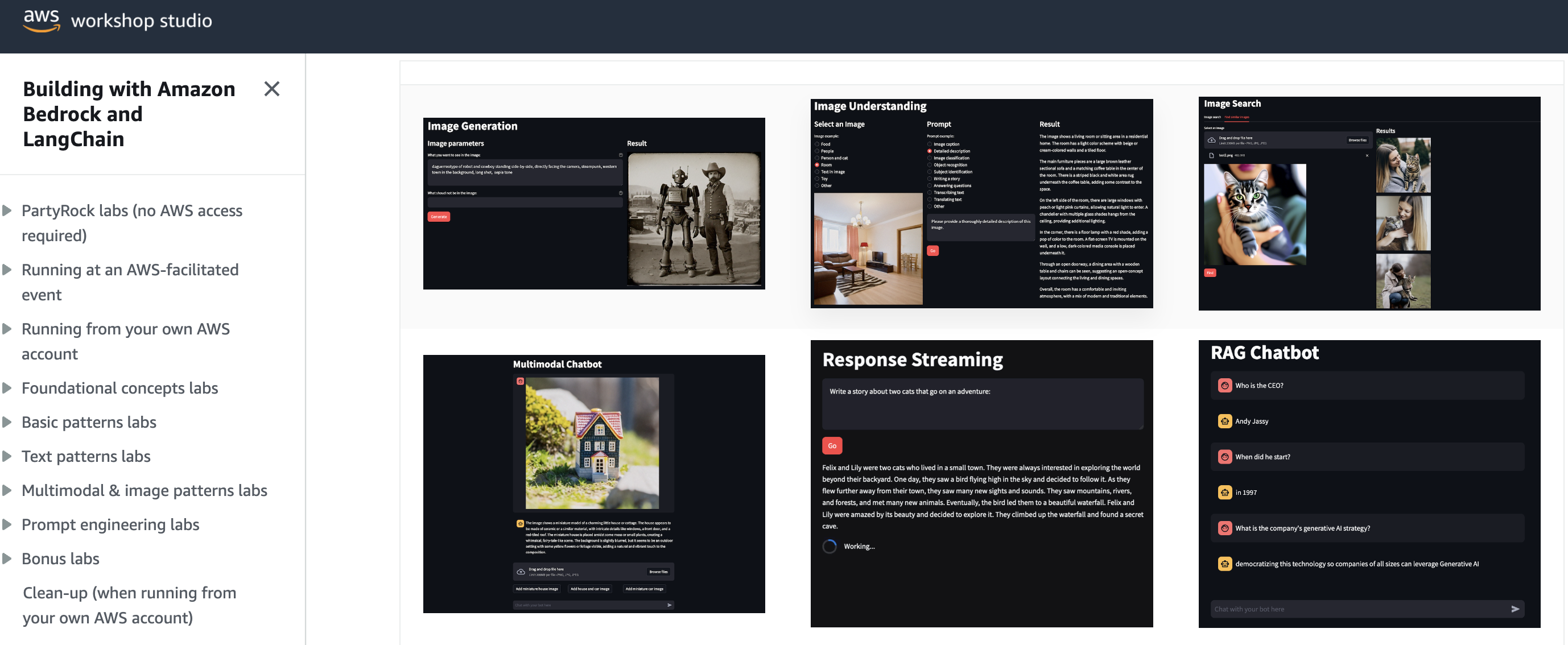
These are my notes for the Workshop Section.
In the workshop you have two methods of running the labs, at an AWS event, or in your own account.
Running in my own AWS account
Enable Bedrock
I've already done this.
AWS Cloud9 setup
spin up a t3.small EC2 instance.
pull down the repo:
cd ~/environment/
curl 'https://static.us-east-1.prod.workshops.aws/public/b41bacc3-e25c-4826-8554-b4aa2cb9a2e5/assets/workshop.zip' --output workshop.zip
unzip workshop.zip
install requirements
pip3 install -r ~/environment/workshop/setup/requirements.txt -U
test working
cloudbuilderio:~/environment/workshop $ python3 ./completed/api/bedrock_api.py

Manchester is the largest and most populous city in New Hampshire.
Local Setup
Please note, for a few of the labs I ran it in my local Linux environment which required specific setup to get things going.
I still downloaded the workshop.zip and followed instructions as per, but had to tweak my environment along the way.
A few things if you're going to run local, in the root workshop/ directory:
- create a virtual env:
python3 -m venv .env - activate it:
source .env/bin/activate - install dependencies
pip3 install -r requirements
I will list my compiled requirements.txt here:
# requirements
boto3
langchain_community
streamlit
langchain
pypdf
Foundational Concepts
Play around with examples, play with temp, top p, response length.
View API request doesn't show up on all examples (greyed out).
Here's one:
aws bedrock-runtime invoke-model \
--model-id meta.llama2-13b-chat-v1 \
--body "{\"prompt\":\"[INST]You are a a very intelligent bot with exceptional critical thinking[/INST]\\nI went to the market and bought 10 apples. I gave 2 apples to your friend and 2 to the helper. I then went and bought 5 more apples and ate 1. How many apples did I remain with?\\n\\nLet's think step by step.\\n\\n\\nFirst, I went to the market and bought 10 apples.\\n\\nThen, I gave 2 apples to your friend.\\n\\nSo, I have 10 - 2 = 8 apples left.\\n\\nNext, I gave 2 apples to the helper.\\n\\nSo, I have 8 - 2 = 6 apples left.\\n\\nNow, I went and bought 5 more apples.\\n\\nSo, I have 6 + 5 = 11 apples left.\\n\\nFinally, I ate 1 apple.\\n\\nSo, I have 11 - 1 = 10 apples left.\\n\\nTherefore, I remain with 10 apples.\",\"max_gen_len\":512,\"temperature\":0.5,\"top_p\":0.9}" \
--cli-binary-format raw-in-base64-out \
--region us-east-1 \
invoke-model-output.txt
The API call was most familiar to me because of my SageMaker LLM project, but for that I pointed at an inference endpoint, whereas here we call the --model-id.
API
import json
import boto3

session = boto3.Session()

bedrock = session.client(service_name='bedrock-runtime') #creates a Bedrock client

bedrock_model_id = "ai21.j2-ultra-v1" #set the foundation model

prompt = "What's the name of the emerald mine that Elon Musk's father owns?" #the prompt to send to the model

body = json.dumps({
    "prompt": prompt, #AI21
    "maxTokens": 1024,
    "temperature": 0,
    "topP": 0.5,
    "stopSequences": [],
    "countPenalty": {"scale": 0 },
    "presencePenalty": {"scale": 0 },
    "frequencyPenalty": {"scale": 0 }
}) #build the request payload

# invoke

response = bedrock.invoke_model(body=body, modelId=bedrock_model_id, accept='application/json', contentType='application/json') #send the payload to Bedrock

response_body = json.loads(response.get('body').read()) # read the response

response_text = response_body.get("completions")[0].get("data").get("text") #extract the text from the JSON response

print(response_text)
output
~/R/AWSB/w/l/api ❯ python3 ./bedrock_api.py

Elon Musk's father, Errol Musk, owns the emerald mine in Chivor, Colombia.
I originally set my prompt to "Write a poem about Serena Williams" and this is what I got:
~/R/AWSB/w/l/api ❯ python3 ./bedrock_api.py             took 4s

Manchester is the largest and most populous city in New Hampshire.

~/R/AWSB/w/l/api ❯ python3 ./bedrock_api.py            took 19s

Serena Williams,

A champion on the court,

A role model off,

A fierce competitor,

A fierce advocate for equality,

A fierce advocate for women's rights,

A fierce advocate for social justice,

A fierce advocate for change,

A fierce advocate for herself,

A fierce advocate for others,

A fierce advocate for the game,

A fierce advocate for the sport,

A fierce advocate for the world,

A fierce advocate for humanity,

A fierce advocate for love,

A fierce advocate for life,

A fierce advocate for everything,

A fierce advocate for nothing,

A fierce advocate for everything,

A fierce advocate for nothing,
...

# repeats the everything, nothing line again 263 times!!!
a bit 😬.
✅ For the single answer questions, the API is really quite fast: ~4s
⚠️ The poem took a while ~19s but from the output, looked caught in a loop.
Langchain
| ✅ Pros | ❌ Cons | |
|---|---|---|
| boto3 | more control, details | have to handle, manage more details |
| Langchain | abstracted, focus on text in and out | less verbose, granular than boto3 |
Code:
from langchain_community.llms import Bedrock

llm = Bedrock( #create a Bedrock llm client
    model_id="ai21.j2-ultra-v1" #set the foundation model
)

prompt = "What is the largest city in New Zealand?"

response_text = llm.invoke(prompt) #return a response to the prompt

print(response_text)
output
~/R/AWSB/w/l/langchain ❯ python3 ./bedrock_langchain.py

The largest city in New Zealand is Auckland, with a population of approximately 1.5 million. It is located
Code must smaller than with boto3.
Inference Parameters
I had to update some details in the workshop code as default params for the models had been updated e.g. for Anthropic, the parameter is replaced max_tokens with max_tokens_to_sample
import sys
from langchain_community.llms import Bedrock

def get_inference_parameters(model): #return a default set of parameters based on the model's provider
    bedrock_model_provider = model.split('.')[0] #grab the model provider from the first part of the model id

    if (bedrock_model_provider == 'anthropic'): #Anthropic model
        return { #anthropic
            "max_tokens_to_sample": 512, # my update
            "temperature": 0,
            "top_k": 250,
            "top_p": 1,
            "stop_sequences": ["\n\nHuman:"]
           }

    elif (bedrock_model_provider == 'ai21'): #AI21
        return { #AI21
            "maxTokens": 512,
            "temperature": 0,
            "topP": 0.5,
            "stopSequences": [],
            "countPenalty": {"scale": 0 },
            "presencePenalty": {"scale": 0 },
            "frequencyPenalty": {"scale": 0 }
           }

    elif (bedrock_model_provider == 'cohere'): #COHERE
        return {
            "max_tokens": 512,
            "temperature": 0,
            "p": 0.01,
            "k": 0,
            "stop_sequences": [],
            "return_likelihoods": "NONE"
        }

    elif (bedrock_model_provider == 'meta'): #META
        return {
            "temperature": 0,
            "top_p": 0.9,
            "max_gen_len": 512
        }

    elif (bedrock_model_provider == 'mistral'): #MISTRAL
        return {
            "max_tokens" : 512,
            "stop" : [],
            "temperature": 0,
            "top_p": 0.9,
            "top_k": 50
        }

    else: #Amazon
        #For the LangChain Bedrock implementation, these parameters will be added to the
        #textGenerationConfig item that LangChain creates for us
        return {
            "maxTokenCount": 512,
            "stopSequences": [],
            "temperature": 0,
            "topP": 0.9
        }

# setup a function that pulls our request params together
def get_text_response(model, input_content): #text-to-text client function

    model_kwargs = get_inference_parameters(model) #get the default parameters based on the selected model

    llm = Bedrock( #create a Bedrock llm client
        model_id=model, #use the requested model
        model_kwargs = model_kwargs
    )

    return llm.invoke(input_content) #return a response to the prompt

# make a call, capture in response
response = get_text_response(sys.argv[1], sys.argv[2])

print(response)
Run it with args (cos you asked for sys.argv[1] and sys.argv[2]):
python3 ./params.py "ai21.j2-ultra-v1" "Write a haiku:"
output:
~/R/AWSB/w/l/params ❯ python3 ./params.py "ai21.j2-ultra-v1" "Write a haiku:"

leaves rustle in breeze
autumn colors slowly fade
nature's symphony
Control Response Variability
import sys
from langchain_community.llms import Bedrock

def get_text_response(input_content, temperature): #text-to-text client function

  model_kwargs = { #AI21
      "maxTokens": 1024,
      "temperature": temperature,
      "topP": 0.5,
      "stopSequences": [],
      "countPenalty": {"scale": 0 },
      "presencePenalty": {"scale": 0 },
      "frequencyPenalty": {"scale": 0 }
  }

  llm = Bedrock( #create a Bedrock llm client
      model_id="ai21.j2-ultra-v1",
      model_kwargs = model_kwargs
  )

  return llm.invoke(input_content) #return a response to the prompt

for i in range(3):
  response = get_text_response(sys.argv[1], float(sys.argv[2]))
  print(response)
Basically, you're setting up the function to take temperature argument from user, pass it into the model kwargs.
A temperature of 0.0 should give you same reponse every time, anything over that should have some variety.
output:
/workshop/labs/temperature ❯ python3 ./temperature.py "Write a haiku about China" 1.0s

China - vast and ancient
A land of contrasts and wonders
A tapestry woven

China - vast and ancient
A land of contrasts and mystery
A tapestry woven through time

China - vast and ancient
A land of contrasts and wonders
A tapestry woven
/workshop/labs/temperature ❯ python3 ./temperature.py "Write a haiku about China" 1.0s

China - vast and ancient
A land of contrasts and mystery
A tapestry woven through time

China - vast and ancient
A land of contrasts and wonders
A journey to discovery

China - vast and ancient
A land of contrasts and wonders
A tapestry woven
/workshop/labs/temperature ❯ python3 ./temperature.py "Write a haiku about China" 1.0s

China - vast and ancient
A land of contrasts and wonders
A place to discover

China - vast and ancient
A land of contrasts and wonders
A journey to discovery

China - vast and ancient
A land of contrasts and mystery
A tapestry woven through time
/workshop/labs/temperature ❯ python3 ./temperature.py "Write a haiku about China" 1.0s

China - vast and ancient
A land of contrasts and mystery
A fascinating country

China - vast and ancient
A land of contrasts and wonders
A journey to discovery

China - vast and ancient
A land of contrasts and mystery
A tapestry woven through time
/workshop/labs/temperature ❯ python3 ./temperature.py "Write a haiku about China" 1.0s

China - vast and ancient
A land of contrasts and mystery
A tapestry woven through time

China - vast and ancient
A land of contrasts and wonders
A culture rich and beautiful

China - vast and ancient
A land of contrasts and mystery
A world of wonder
Pretty shit tbh 🤣
Streaming API
import json
import boto3

session = boto3.Session()

bedrock = session.client(service_name='bedrock-runtime') #creates a Bedrock client

def chunk_handler(chunk):
  print(chunk, end='')

def get_streaming_response(prompt, streaming_callback):

  bedrock_model_id = "anthropic.claude-3-sonnet-20240229-v1:0" #set the foundation model

  body = json.dumps({
    "prompt": prompt, #ANTHROPIC
    "max_tokens": 4000,
    "temperature": 0,
    "top_k": 250,
    "top_p": 1,
    "stop_sequences": ["\n\nHuman:"]
})


  body = json.dumps({
    "anthropic_version": "bedrock-2023-05-31",
    "max_tokens": 8000,
    "temperature": 0,
    "messages": [
      {
        "role": "user",
        "content": [{ "type": "text", "text": prompt } ]
      }
    ],
  })

  response = bedrock.invoke_model_with_response_stream(modelId=bedrock_model_id, body=body) #invoke the streaming method

  for event in response.get('body'):
    chunk = json.loads(event['chunk']['bytes'])

    if chunk['type'] == 'content_block_delta':
      if chunk['delta']['type'] == 'text_delta':
        streaming_callback(chunk['delta']['text'])

prompt = "Tell me a story about two puppies and two kittens who became best friends:"

get_streaming_response(prompt, chunk_handler)
Clunky, but works as expected:
workshop/labs/intro_streaming ❯ python3 ./intro_streaming.py took 10s .env at 12:42:30
Here is a story about two puppies and two kittens who became best friends:
Daisy and Buddy were two rambunctious golden retriever puppies who loved to play and get into mischief. One sunny day, they dug their way under the fence into the neighbor's yard. To their surprise, they came face to face with two tiny kittens named Smokey and Ginger who had been born just a few weeks earlier.
At first, the puppies and kittens were wary of each other, having never seen animals like that before. Daisy barked and Buddy wagged his tail furiously. Smokey arched his back and hissed while little Ginger tried to hide behind a potted plant. But after circling each other cautiously, Daisy plopped down and let out a friendly puppy whine. Smokey was the first to relax, sniffing at the puppies' faces.
From that day on, the four became an inseparable crew. The puppies were infinitely gentle and patient, letting the kittens climb all over them. They taught the kittens to play chase and tug-of-war with old socks. The kittens showed the puppies how to stalk and pounce on toys. They napped together in warm puppy piles, taking turns grooming each other's fur.
As they grew older, their differences didn't matter at all. Daisy, Buddy, Smokey and Ginger were the best of friends who loved romping in the yard, going on walks together, and curling up side-by-side at naptime and bedtime. Their unique little family brought joy to all the neighbors who watched their silly antics and special bond. The four friends proved that differences don't matter when you have fun, caring companions to share your days with.%
Embeddings
from langchain_community.embeddings import BedrockEmbeddings
from numpy import dot
from numpy.linalg import norm

#create an Amazon Titan Embeddings client
belc = BedrockEmbeddings()

class EmbedItem:
  def __init__(self, text):
    self.text = text
    self.embedding = belc.embed_query(text)

class ComparisonResult:
  def __init__(self, text, similarity):
    self.text = text
    self.similarity = similarity

def calculate_similarity(a, b): #See Cosine Similarity: https://en.wikipedia.org/wiki/Cosine_similarity
  return dot(a, b) / (norm(a) * norm(b))

#Build the list of embeddings to compare
items = []

with open("items.txt", "r") as f:
  text_items = f.read().splitlines()

for text in text_items:
  items.append(EmbedItem(text))

# compare
for e1 in items:
  print(f"Closest matches for '{e1.text}'")
  print ("----------------")
  cosine_comparisons = []

  for e2 in items:
    similarity_score = calculate_similarity(e1.embedding, e2.embedding)

    cosine_comparisons.append(ComparisonResult(e2.text, similarity_score)) #save the comparisons to a list

  cosine_comparisons.sort(key=lambda x: x.similarity, reverse=True) # list the closest matches first

  for c in cosine_comparisons:
    print("%.6f" % c.similarity, "\t", c.text)

  print()
output looks good, ranks match scores accordingly:
python3 ./bedrock_embedding.py took 31s .env at 13:36:19
Closest matches for 'Felines, canines, and rodents'
----------------
1.000000 Felines, canines, and rodents
0.872856 Cats, dogs, and mice
0.599730 Chats, chiens et souris
0.516598 Lions, tigers, and bears
0.455923 猫、犬、ネズミ
0.068916 パン屋への道順を知りたい
0.061314 パン屋への行き方を教えてください
0.002239 Can you please tell me how to get to the stadium?
-0.003159 Kannst du mir bitte sagen, wie ich zur Bäckerei komme?
-0.007595 Can you please tell me how to get to the bakery?
-0.019469 Pouvez-vous s'il vous plaît me dire comment me rendre à la boulangerie?
-0.020840 I need directions to the bread shop
Closest matches for 'Can you please tell me how to get to the bakery?'
----------------
1.000000 Can you please tell me how to get to the bakery?
0.712236 I need directions to the bread shop
0.541959 Pouvez-vous s'il vous plaît me dire comment me rendre à la boulangerie?
0.484672 Can you please tell me how to get to the stadium?
0.455479 パン屋への行き方を教えてください
0.406388 パン屋への道順を知りたい
0.369163 Kannst du mir bitte sagen, wie ich zur Bäckerei komme?
0.078357 猫、犬、ネズミ
0.022138 Cats, dogs, and mice
0.015661 Lions, tigers, and bears
0.005211 Chats, chiens et souris
-0.007595 Felines, canines, and rodents
Closest matches for 'Lions, tigers, and bears'
----------------
1.000000 Lions, tigers, and bears
0.530917 Cats, dogs, and mice
0.516598 Felines, canines, and rodents
0.386125 Chats, chiens et souris
0.337012 猫、犬、ネズミ
0.068164 I need directions to the bread shop
0.056721 Pouvez-vous s'il vous plaît me dire comment me rendre à la boulangerie?
0.054695 Kannst du mir bitte sagen, wie ich zur Bäckerei komme?
0.042972 パン屋への道順を知りたい
0.032731 Can you please tell me how to get to the stadium?
0.021517 パン屋への行き方を教えてください
0.015661 Can you please tell me how to get to the bakery?
Closest matches for 'Chats, chiens et souris'
----------------
1.000000 Chats, chiens et souris
0.669460 Cats, dogs, and mice
0.599730 Felines, canines, and rodents
0.498394 猫、犬、ネズミ
0.386125 Lions, tigers, and bears
0.299799 Pouvez-vous s'il vous plaît me dire comment me rendre à la boulangerie?
0.156950 パン屋への道順を知りたい
0.131597 パン屋への行き方を教えてください
0.091534 Kannst du mir bitte sagen, wie ich zur Bäckerei komme?
0.025773 I need directions to the bread shop
0.005211 Can you please tell me how to get to the bakery?
-0.036810 Can you please tell me how to get to the stadium?
Closest matches for '猫、犬、ネズミ'
----------------
1.000000 猫、犬、ネズミ
0.503620 Cats, dogs, and mice
0.498394 Chats, chiens et souris
0.487732 パン屋への道順を知りたい
0.460217 パン屋への行き方を教えてください
0.455923 Felines, canines, and rodents
0.337012 Lions, tigers, and bears
0.162600 Kannst du mir bitte sagen, wie ich zur Bäckerei komme?
0.153400 Pouvez-vous s'il vous plaît me dire comment me rendre à la boulangerie?
0.078357 Can you please tell me how to get to the bakery?
0.063395 I need directions to the bread shop
0.014240 Can you please tell me how to get to the stadium?
Closest matches for 'Pouvez-vous s'il vous plaît me dire comment me rendre à la boulangerie?'
----------------
1.000000 Pouvez-vous s'il vous plaît me dire comment me rendre à la boulangerie?
0.592948 I need directions to the bread shop
0.541959 Can you please tell me how to get to the bakery?
0.530933 Kannst du mir bitte sagen, wie ich zur Bäckerei komme?
0.433526 パン屋への行き方を教えてください
0.383732 パン屋への道順を知りたい
0.299799 Chats, chiens et souris
0.241092 Can you please tell me how to get to the stadium?
0.153400 猫、犬、ネズミ
0.056721 Lions, tigers, and bears
0.031843 Cats, dogs, and mice
-0.019469 Felines, canines, and rodents
Closest matches for 'Kannst du mir bitte sagen, wie ich zur Bäckerei komme?'
----------------
1.000000 Kannst du mir bitte sagen, wie ich zur Bäckerei komme?
0.530933 Pouvez-vous s'il vous plaît me dire comment me rendre à la boulangerie?
0.419582 I need directions to the bread shop
0.369163 Can you please tell me how to get to the bakery?
0.360738 パン屋への行き方を教えてください
0.307116 パン屋への道順を知りたい
0.270668 Can you please tell me how to get to the stadium?
0.162600 猫、犬、ネズミ
0.091534 Chats, chiens et souris
0.054695 Lions, tigers, and bears
0.028943 Cats, dogs, and mice
-0.003159 Felines, canines, and rodents
Closest matches for 'パン屋への行き方を教えてください'
----------------
1.000000 パン屋への行き方を教えてください
0.895563 パン屋への道順を知りたい
0.491218 I need directions to the bread shop
0.460217 猫、犬、ネズミ
0.455479 Can you please tell me how to get to the bakery?
0.433526 Pouvez-vous s'il vous plaît me dire comment me rendre à la boulangerie?
0.360738 Kannst du mir bitte sagen, wie ich zur Bäckerei komme?
0.220985 Can you please tell me how to get to the stadium?
0.131597 Chats, chiens et souris
0.078212 Cats, dogs, and mice
0.061314 Felines, canines, and rodents
0.021517 Lions, tigers, and bears
Closest matches for 'パン屋への道順を知りたい'
----------------
1.000000 パン屋への道順を知りたい
0.895563 パン屋への行き方を教えてください
0.487732 猫、犬、ネズミ
0.466405 I need directions to the bread shop
0.406388 Can you please tell me how to get to the bakery?
0.383732 Pouvez-vous s'il vous plaît me dire comment me rendre à la boulangerie?
0.307116 Kannst du mir bitte sagen, wie ich zur Bäckerei komme?
0.156950 Chats, chiens et souris
0.131994 Can you please tell me how to get to the stadium?
0.101027 Cats, dogs, and mice
0.068916 Felines, canines, and rodents
0.042972 Lions, tigers, and bears
Closest matches for 'Can you please tell me how to get to the stadium?'
----------------
1.000000 Can you please tell me how to get to the stadium?
0.484672 Can you please tell me how to get to the bakery?
0.305550 I need directions to the bread shop
0.270668 Kannst du mir bitte sagen, wie ich zur Bäckerei komme?
0.241092 Pouvez-vous s'il vous plaît me dire comment me rendre à la boulangerie?
0.220985 パン屋への行き方を教えてください
0.131994 パン屋への道順を知りたい
0.032731 Lions, tigers, and bears
0.014240 猫、犬、ネズミ
0.002239 Felines, canines, and rodents
-0.008508 Cats, dogs, and mice
-0.036810 Chats, chiens et souris
Closest matches for 'I need directions to the bread shop'
----------------
1.000000 I need directions to the bread shop
0.712236 Can you please tell me how to get to the bakery?
0.592948 Pouvez-vous s'il vous plaît me dire comment me rendre à la boulangerie?
0.491218 パン屋への行き方を教えてください
0.466405 パン屋への道順を知りたい
0.419582 Kannst du mir bitte sagen, wie ich zur Bäckerei komme?
0.305550 Can you please tell me how to get to the stadium?
0.068164 Lions, tigers, and bears
0.063395 猫、犬、ネズミ
0.025934 Cats, dogs, and mice
0.025773 Chats, chiens et souris
-0.020840 Felines, canines, and rodents
Closest matches for 'Cats, dogs, and mice'
----------------
1.000000 Cats, dogs, and mice
0.872856 Felines, canines, and rodents
0.669460 Chats, chiens et souris
0.530917 Lions, tigers, and bears
0.503620 猫、犬、ネズミ
0.101027 パン屋への道順を知りたい
0.078212 パン屋への行き方を教えてください
0.031843 Pouvez-vous s'il vous plaît me dire comment me rendre à la boulangerie?
0.028943 Kannst du mir bitte sagen, wie ich zur Bäckerei komme?
0.025934 I need directions to the bread shop
0.022138 Can you please tell me how to get to the bakery?
-0.008508 Can you please tell me how to get to the stadium?
Streamlit
#all streamlit commands will be available through the "st" alias
import streamlit as st

st.set_page_config(page_title="🔗🦜 Streamlit Demo") #HTML title
st.title("Streamlit Demo") #page title

color_text = st.text_input("What's your favorite color?") #display a text box
go_button = st.button("Go", type="primary") #display a primary button

if go_button:
  #code in this if block will be run when the button is clicked
    st.write(f"I like {color_text} too!") #display the response content
run it with streamlit's command; streamlit run simple_streamlit_app.py --server.port 8080
Model Selection
No hard and fast rules about which model is best for given scenarios, all the ones available on Bedrock seem to do the same-ish thing. Each model will have relative strengths and weaknesses based on its training data, overall size, and training approach.
As as April 6, 2024
| Provider | Model name | Version | Model ID |
|---|---|---|---|
| Amazon | Titan Text G1 - Express | 1.x | amazon.titan-text-express-v1 |
| Amazon | Titan Text G1 - Lite | 1.x | amazon.titan-text-lite-v1 |
| Amazon | Titan Embeddings G1 - Text | 1.x | amazon.titan-embed-text-v1 |
| Amazon | Titan Multimodal Embeddings G1 | 1.x | amazon.titan-embed-image-v1 |
| Amazon | Titan Image Generator G1 | 1.x | amazon.titan-image-generator-v1 |
| Anthropic | Claude | 2.0 | anthropic.claude-v2 |
| Anthropic | Claude | 2.1 | anthropic.claude-v2:1 |
| Anthropic | Claude 3 Sonnet | 1.0 | anthropic.claude-3-sonnet-20240229-v1:0 |
| Anthropic | Claude 3 Haiku | 1.0 | anthropic.claude-3-haiku-20240307-v1:0 |
| Anthropic | Claude Instant | 1.x | anthropic.claude-instant-v1 |
| AI21 Labs | Jurassic-2 Mid | 1.x | ai21.j2-mid-v1 |
| AI21 Labs | Jurassic-2 Ultra | 1.x | ai21.j2-ultra-v1 |
| Cohere | Command | 14.x | cohere.command-text-v14 |
| Cohere | Command Light | 15.x | cohere.command-light-text-v14 |
| Cohere | Embed English | 3.x | cohere.embed-english-v3 |
| Cohere | Embed Multilingual | 3.x | cohere.embed-multilingual-v3 |
| Meta | Llama 2 Chat 13B | 1.x | meta.llama2-13b-chat-v1 |
| Meta | Llama 2 Chat 70B | 1.x | meta.llama2-70b-chat-v1 |
| Mistral AI | Mistral 7B Instruct | 0.x | mistral.mistral-7b-instruct-v0:2 |
| Mistral AI | Mixtral 8X7B Instruct | 0.x | mistral.mixtral-8x7b-instruct-v0:1 |
| Mistral AI | Mistral Large | 1.x | mistral.mistral-large-2402-v1:0 |
| Stability AI | Stable Diffusion XL | 0.x | stability.stable-diffusion-xl-v0 |
| Stability AI | Stable Diffusion XL | 1.x | stability.stable-diffusion-xl-v1 |
Basic patterns
B1 Text Generation
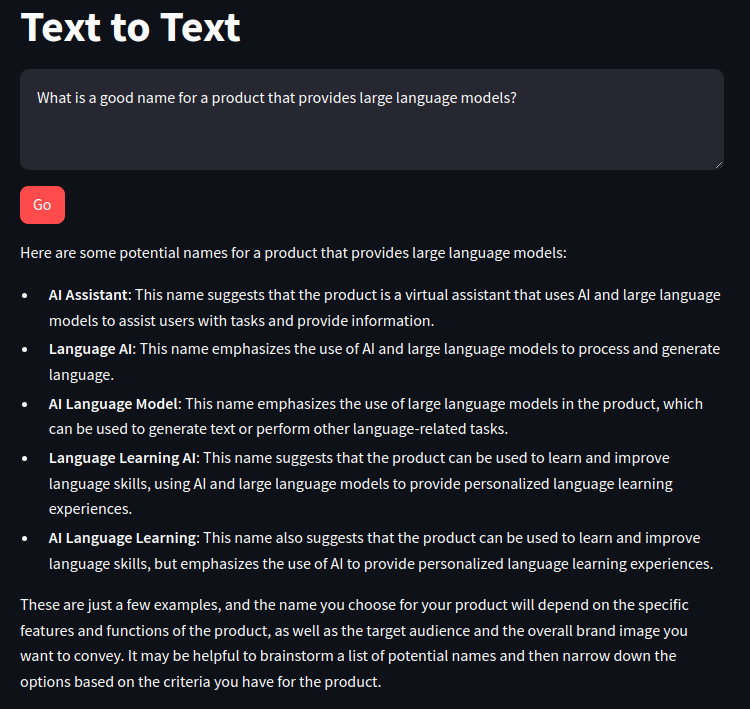
Putting together a streamlit app that does text-to-text generation for us.
Creating 2 x files
text_lib.py# the backend functionstext_app.py# the frontend UI
Backend Functions
from langchain_community.llms import Bedrock

def get_text_response(input_content): #text-to-text client function

    llm = Bedrock( #create a Bedrock llm client
        model_id="cohere.command-text-v14", #set the foundation model
        model_kwargs={
            "max_tokens": 512,
            "temperature": 0,
            "p": 0.01,
            "k": 0,
            "stop_sequences": [],
            "return_likelihoods": "NONE"
        }
    )
    return llm.invoke(input_content) #return a response to the prompt
The streamlit UI
import streamlit as st
import text_lib as glib

# Titles
st.set_page_config(page_title="Text to Text")
st.title("Text to Text")

# Inputs
input_text = st.text_area("Input text", label_visibility="collapsed")
go_button = st.button("Go", type="primary")

# Outputs
if go_button:
  #show a spinner while the code in this with block runs
  with st.spinner("Working..."):
    #call the model through the supporting library
    response_content = glib.get_text_response(input_content=input_text)
    #display the response content
    st.write(response_content)
Run it: streamlit run text_app.py --server.port 8080
Success
B2 Image Generation
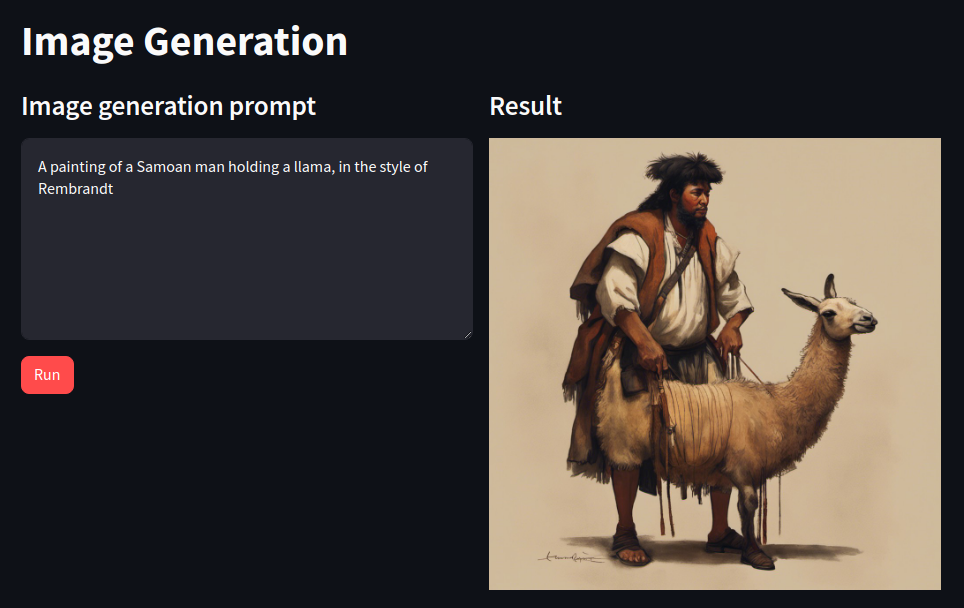
Same as text generation, we have a _lib.py file (backend) and an _app.py file (frontend)
import boto3 #import aws sdk and supporting libraries
import json
import base64
from io import BytesIO

# init client, bedrock id
session = boto3.Session()
bedrock = session.client(service_name='bedrock-runtime') #creates a Bedrock client
bedrock_model_id = "stability.stable-diffusion-xl-v1" #use the Stable Diffusion model

# convert reponse to streamlit can display
def get_response_image_from_payload(response): #returns the image bytes from the model response payload

    payload = json.loads(response.get('body').read()) #load the response body into a json object
    images = payload.get('artifacts') #extract the image artifacts
    image_data = base64.b64decode(images[0].get('base64')) #decode image

    return BytesIO(image_data) #return a BytesIO object for client app consumption

# call bedrock from UI
def get_image_response(prompt_content): #text-to-text client function

    request_body = json.dumps({"text_prompts":
                               [ {"text": prompt_content } ], #prompts to use
                               "cfg_scale": 9, #how closely the model tries to match the prompt
                               "steps": 50, }) #number of diffusion steps to perform

    response = bedrock.invoke_model(body=request_body, modelId=bedrock_model_id) #call the Bedrock endpoint

    output = get_response_image_from_payload(response) #convert the response payload to a BytesIO object for the client to consume

    return output
Frontend
import streamlit as st #all streamlit commands will be available through the "st" alias
import image_lib as glib #reference to local lib script

st.set_page_config(layout="wide", page_title="Image Generation") #set the page width wider to accommodate columns
st.title("Image Generation") #page title
col1, col2 = st.columns(2) #create 2 columns

with col1: #everything in this with block will be placed in column 1
    st.subheader("Image generation prompt") #subhead for this column
    prompt_text = st.text_area("Prompt text", height=200, label_visibility="collapsed") #display a multiline text box with no label
    process_button = st.button("Run", type="primary") #display a primary button

with col2: #everything in this with block will be placed in column 2
    st.subheader("Result") #subhead for this column
    if process_button: #code in this if block will be run when the button is clicked
        with st.spinner("Drawing..."): #show a spinner while the code in this with block runs
            generated_image = glib.get_image_response(prompt_content=prompt_text) #call the model through the supporting library
        st.image(generated_image) #display the generated image
Run it: streamlit run text_app.py --server.port 8080
Success
B3 RAG
from langchain_community.embeddings import BedrockEmbeddings
from langchain.indexes import VectorstoreIndexCreator
from langchain_community.vectorstores import FAISS
from langchain_text_splitters import RecursiveCharacterTextSplitter
from langchain_community.document_loaders import PyPDFLoader
from langchain_community.llms import Bedrock

def get_llm():

    model_kwargs = { #AI21
        "maxTokens": 1024,
        "temperature": 0,
        "topP": 0.5,
        "stopSequences": [],
        "countPenalty": {"scale": 0 },
        "presencePenalty": {"scale": 0 },
        "frequencyPenalty": {"scale": 0 }
    }

    llm = Bedrock(
        model_id="ai21.j2-ultra-v1", #set the foundation model
        model_kwargs=model_kwargs) #configure the properties for Claude

    return llm

def get_index(): #creates and returns an in-memory vector store to be used in the application

    embeddings = BedrockEmbeddings() #create a Titan Embeddings client
    pdf_path = "2022-Shareholder-Letter.pdf" #assumes local PDF file with this name
    loader = PyPDFLoader(file_path=pdf_path) #load the pdf file

    text_splitter = RecursiveCharacterTextSplitter( #create a text splitter
        separators=["\n\n", "\n", ".", " "], #split chunks at (1) paragraph, (2) line, (3) sentence, or (4) word, in that order
        chunk_size=1000, #divide into 1000-character chunks using the separators above
        chunk_overlap=100 #number of characters that can overlap with previous chunk
    )

    index_creator = VectorstoreIndexCreator( #create a vector store factory
        vectorstore_cls=FAISS, #use an in-memory vector store for demo purposes
        embedding=embeddings, #use Titan embeddings
        text_splitter=text_splitter, #use the recursive text splitter
    )

    index_from_loader = index_creator.from_loaders([loader]) #create an vector store index from the loaded PDF

    return index_from_loader #return the index to be cached by the client app

def get_rag_response(index, question): #rag client function

    llm = get_llm()
    response_text = index.query(question=question, llm=llm) #search against the in-memory index, stuff results into a prompt and send to the llm

    return response_text
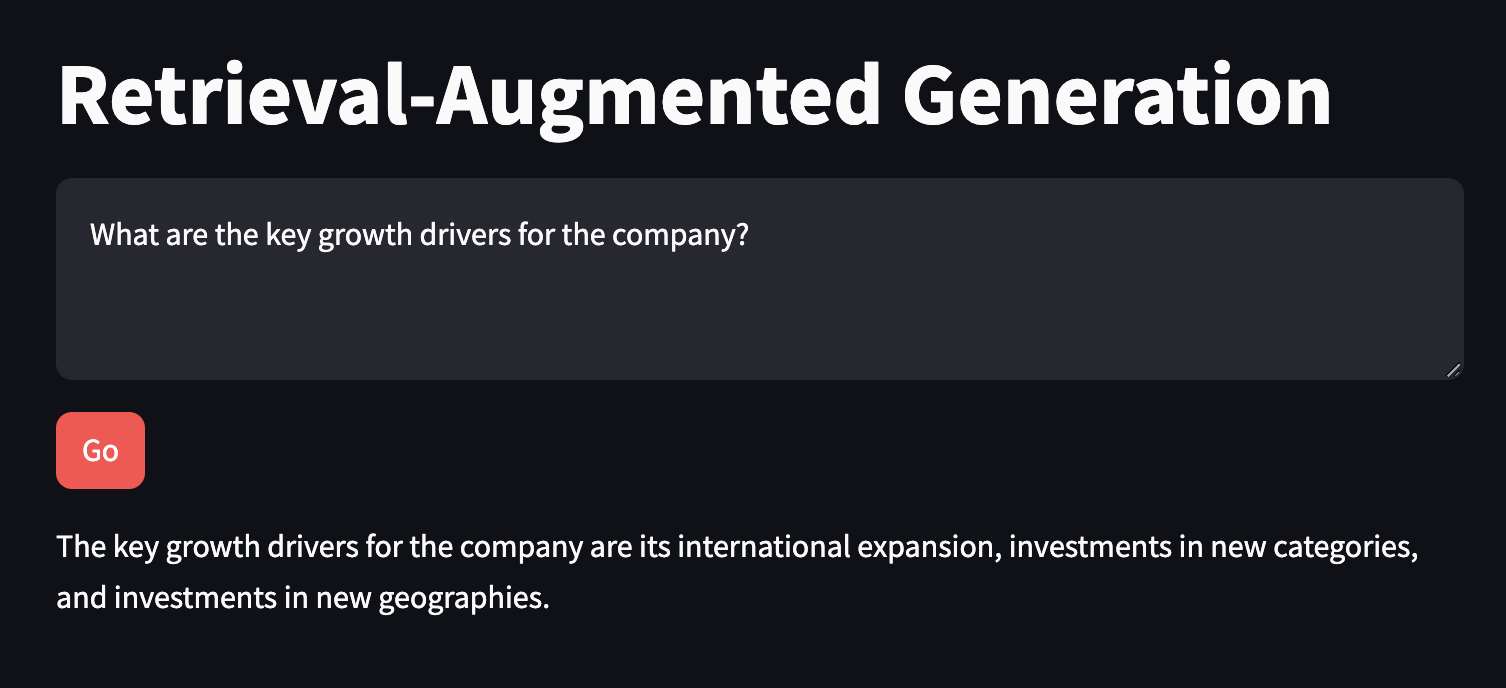
streamlit app rag_app.py
import streamlit as st #all streamlit commands will be available through the "st" alias
import rag_lib as glib #reference to local lib script

# Titles
st.set_page_config(page_title="Retrieval-Augmented Generation") #HTML title
st.title("Retrieval-Augmented Generation") #page title

# Vector Index
if 'vector_index' not in st.session_state: #see if the vector index hasn't been created yet
    with st.spinner("Indexing document..."): #show a spinner while the code in this with block runs
        st.session_state.vector_index = glib.get_index() #retrieve the index through the supporting library and store in the app's session cache

# Inputs
input_text = st.text_area("Input text", label_visibility="collapsed") #display a multiline text box with no label
go_button = st.button("Go", type="primary") #display a primary button

# Outputs
if go_button: #code in this if block will be run when the button is clicked

    with st.spinner("Working..."): #show a spinner while the code in this with block runs
        response_content = glib.get_rag_response(index=st.session_state.vector_index, question=input_text) #call the model through the supporting library

        st.write(response_content) #display the response content
add requirements: faiss-cpu
Run it: streamlit run rag_app.py --server.port 8080
Success
B4 Chatbot
Create backend functions
from langchain.memory import ConversationSummaryBufferMemory
from langchain_community.chat_models import BedrockChat
from langchain.chains import ConversationChain

# setup LLM
def get_llm():

    model_kwargs = { #anthropic
        "max_tokens": 512,
        "temperature": 0,
        "top_k": 250,
        "top_p": 1,
        "stop_sequences": ["\n\nHuman:"]
    }

    llm = BedrockChat(
        model_id="anthropic.claude-3-sonnet-20240229-v1:0", #set the foundation model
        model_kwargs=model_kwargs) #configure the properties for Claude

    return llm

# init a langchain memory object
def get_memory(): #create memory for this chat session

    #ConversationSummaryBufferMemory requires an LLM for summarizing older messages
    #this allows us to maintain the "big picture" of a long-running conversation
    llm = get_llm()

    memory = ConversationSummaryBufferMemory(llm=llm, max_token_limit=1024) #Maintains a summary of previous messages

    return memory

# call bedrock
def get_chat_response(input_text, memory): #chat client function

    llm = get_llm()

    conversation_with_summary = ConversationChain( #create a chat client
        llm = llm, #using the Bedrock LLM
        memory = memory, #with the summarization memory
        verbose = True #print out some of the internal states of the chain while running
    )

    chat_response = conversation_with_summary.invoke(input_text) #pass the user message and summary to the model

    return chat_response['response']
Setup frontend UI
import streamlit as st #all streamlit commands will be available through the "st" alias
import chatbot_lib as glib #reference to local lib script

# titles

st.set_page_config(page_title="Chatbot") #HTML title
st.title("Chatbot") #page title

# add langchain memory to session cache

if 'memory' not in st.session_state: #see if the memory hasn't been created yet
    st.session_state.memory = glib.get_memory() #initialize the memory

# add ui chat history to session cache

if 'chat_history' not in st.session_state: #see if the chat history hasn't been created yet
    st.session_state.chat_history = [] #initialize the chat history

# render previous chat using a loop

if 'chat_history' not in st.session_state: #see if the chat history hasn't been created yet
    st.session_state.chat_history = [] #initialize the chat history

# Inputs


input_text = st.chat_input("Chat with your bot here") #display a chat input box

if input_text: #run the code in this if block after the user submits a chat message

    with st.chat_message("user"): #display a user chat message
        st.markdown(input_text) #renders the user's latest message

    st.session_state.chat_history.append({"role":"user", "text":input_text}) #append the user's latest message to the chat history

    chat_response = glib.get_chat_response(input_text=input_text, memory=st.session_state.memory) #call the model through the supporting library

    with st.chat_message("assistant"): #display a bot chat message
        st.markdown(chat_response) #display bot's latest response

    st.session_state.chat_history.append({"role":"assistant", "text":chat_response}) #append the bot's latest message to the chat history
add requirements: anthropic
Run it: streamlit run chatbot_app.py --server.port 8080
Success
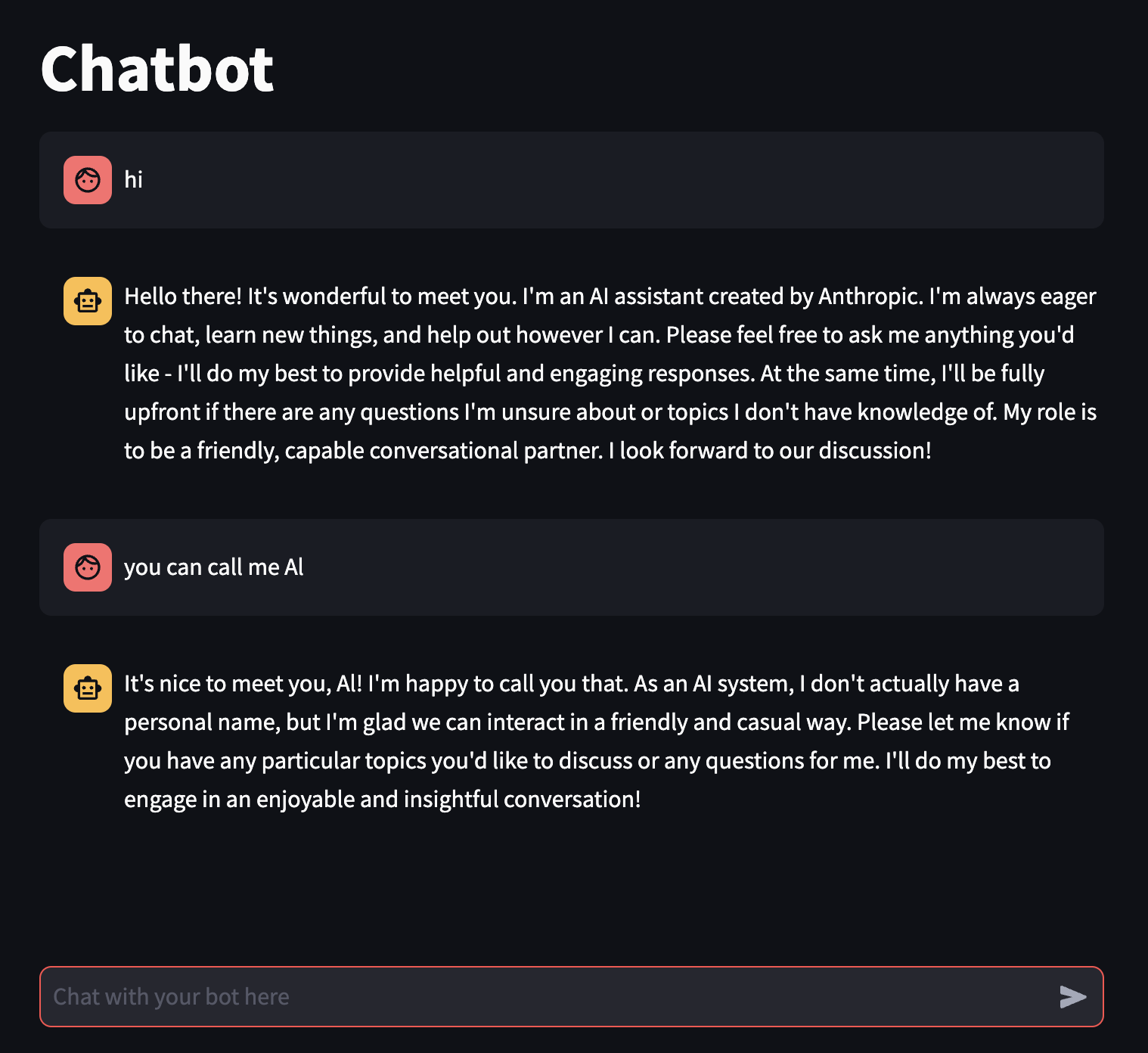
Text Patterns
T1 Chatbot RAG
Backend functions
from langchain.memory import ConversationBufferWindowMemory
from langchain_community.chat_models import BedrockChat
from langchain.chains import ConversationalRetrievalChain

from langchain_community.embeddings import BedrockEmbeddings
from langchain.indexes import VectorstoreIndexCreator
from langchain_community.vectorstores import FAISS
from langchain_text_splitters import RecursiveCharacterTextSplitter
from langchain_community.document_loaders import PyPDFLoader

# setup llm
def get_llm():

    model_kwargs = { #anthropic
        "max_tokens": 512,
        "temperature": 0,
        "top_k": 250,
        "top_p": 1,
        "stop_sequences": ["\n\nHuman:"]
    }

    llm = BedrockChat(
        model_id="anthropic.claude-3-sonnet-20240229-v1:0", #set the foundation model
        model_kwargs=model_kwargs) #configure the properties for Claude

    return llm

# in-memory vector store

def get_index(): #creates and returns an in-memory vector store to be used in the application

    embeddings = BedrockEmbeddings() #create a Titan Embeddings client

    pdf_path = "2022-Shareholder-Letter.pdf" #assumes local PDF file with this name

    loader = PyPDFLoader(file_path=pdf_path) #load the pdf file

    text_splitter = RecursiveCharacterTextSplitter( #create a text splitter
        separators=["\n\n", "\n", ".", " "], #split chunks at (1) paragraph, (2) line, (3) sentence, or (4) word, in that order
        chunk_size=1000, #divide into 1000-character chunks using the separators above
        chunk_overlap=100 #number of characters that can overlap with previous chunk
    )

    index_creator = VectorstoreIndexCreator( #create a vector store factory
        vectorstore_cls=FAISS, #use an in-memory vector store for demo purposes
        embedding=embeddings, #use Titan embeddings
        text_splitter=text_splitter, #use the recursive text splitter
    )

    index_from_loader = index_creator.from_loaders([loader]) #create an vector store index from the loaded PDF

    return index_from_loader #return the index to be cached by the client app

# init langchain memory object

def get_memory(): #create memory for this chat session

    memory = ConversationBufferWindowMemory(memory_key="chat_history", return_messages=True) #Maintains a history of previous messages

    return memory

# call bedrock
def get_rag_chat_response(input_text, memory, index): #chat client function

    llm = get_llm()

    conversation_with_retrieval = ConversationalRetrievalChain.from_llm(llm, index.vectorstore.as_retriever(), memory=memory, verbose=True)

    chat_response = conversation_with_retrieval.invoke({"question": input_text}) #pass the user message and summary to the model

    return chat_response['answer']
Frontend UI
import streamlit as st #all streamlit commands will be available through the "st" alias
import rag_chatbot_lib as glib #reference to local lib script

# titles
st.set_page_config(page_title="RAG Chatbot") #HTML title
st.title("RAG Chatbot") #page title

# add langchain memory to session cache
if 'memory' not in st.session_state: #see if the memory hasn't been created yet
    st.session_state.memory = glib.get_memory() #initialize the memory

# add UI history to session cache
if 'chat_history' not in st.session_state: #see if the chat history hasn't been created yet
    st.session_state.chat_history = [] #initialize the chat history

# add vector index to session cache
if 'vector_index' not in st.session_state: #see if the vector index hasn't been created yet
    with st.spinner("Indexing document..."): #show a spinner while the code in this with block runs
        st.session_state.vector_index = glib.get_index() #retrieve the index through the supporting library and store in the app's session cache

# Output - render chat history
#Re-render the chat history (Streamlit re-runs this script, so need this to preserve previous chat messages)
for message in st.session_state.chat_history: #loop through the chat history
    with st.chat_message(message["role"]): #renders a chat line for the given role, containing everything in the with block
        st.markdown(message["text"]) #display the chat content

# Inputs
input_text = st.chat_input("Chat with your bot here") #display a chat input box

if input_text: #run the code in this if block after the user submits a chat message

    with st.chat_message("user"): #display a user chat message
        st.markdown(input_text) #renders the user's latest message

    st.session_state.chat_history.append({"role":"user", "text":input_text}) #append the user's latest message to the chat history

    chat_response = glib.get_rag_chat_response(input_text=input_text, memory=st.session_state.memory, index=st.session_state.vector_index,) #call the model through the supporting library

    with st.chat_message("assistant"): #display a bot chat message
        st.markdown(chat_response) #display bot's latest response

    st.session_state.chat_history.append({"role":"assistant", "text":chat_response}) #append the bot's latest message to the chat history
add requirements: anthropic
Run it: streamlit run chatbot_app.py --server.port 8080
Success
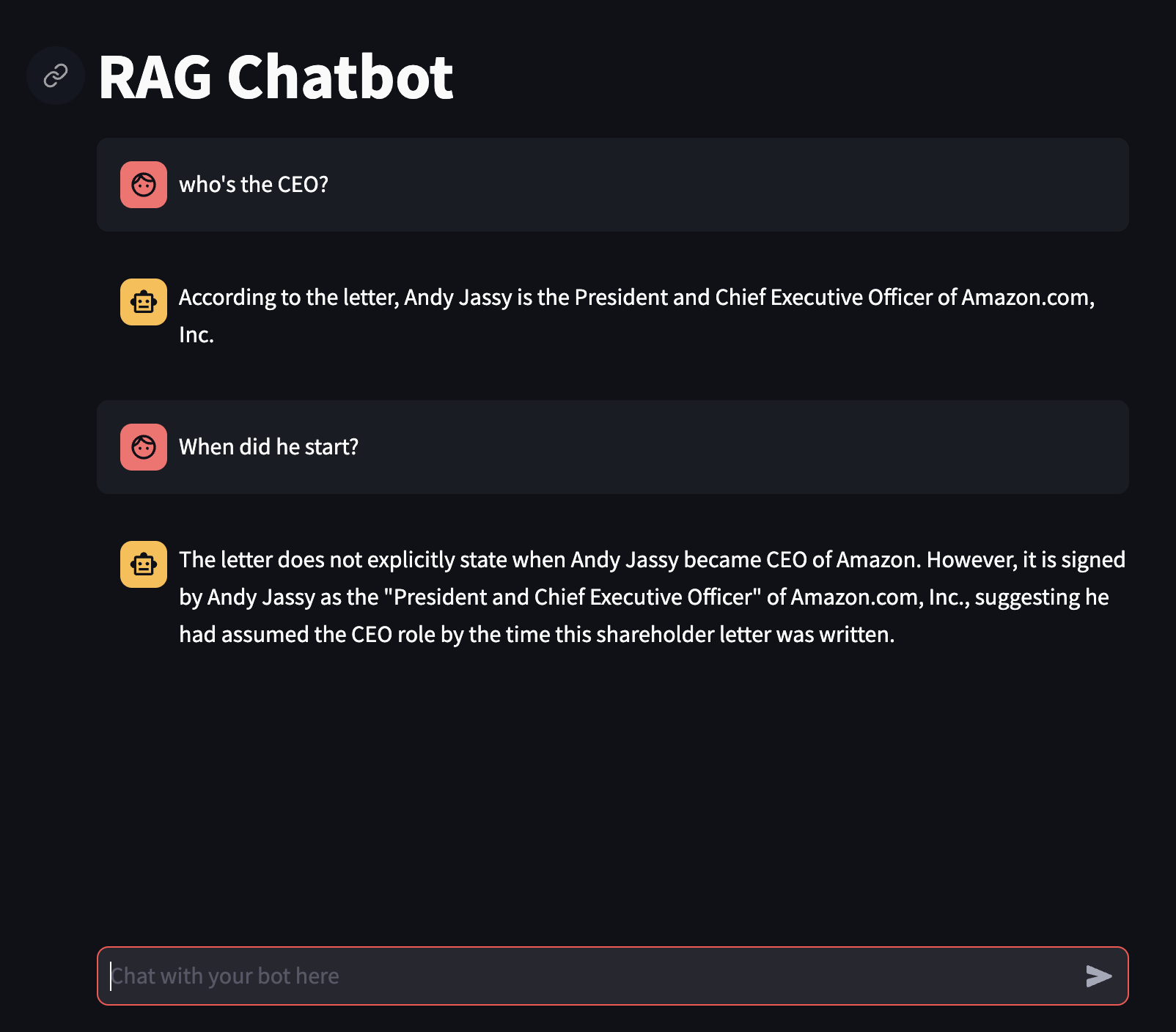
T2 Doc Summary
Backend functions
from langchain.prompts import PromptTemplate
from langchain_community.llms import Bedrock
from langchain.chains.summarize import load_summarize_chain
from langchain_text_splitters import RecursiveCharacterTextSplitter
from langchain_community.document_loaders import PyPDFLoader

# setup llm
def get_llm():

    model_kwargs = { #AI21
        "maxTokens": 8000,
        "temperature": 0,
        "topP": 0.5,
        "stopSequences": [],
        "countPenalty": {"scale": 0 },
        "presencePenalty": {"scale": 0 },
        "frequencyPenalty": {"scale": 0 }
    }

    llm = Bedrock(
        model_id="ai21.j2-ultra-v1", #set the foundation model
        model_kwargs=model_kwargs) #configure the properties for Claude

    return llm

# create doc chunks of PDF
pdf_path = "2022-Shareholder-Letter.pdf"

def get_docs():

    loader = PyPDFLoader(file_path=pdf_path)
    documents = loader.load()
    text_splitter = RecursiveCharacterTextSplitter(
        separators=["\n\n", "\n", ".", " "], chunk_size=4000, chunk_overlap=100
    )
    docs = text_splitter.split_documents(documents=documents)

    return docs

# call bedrock
def get_summary(return_intermediate_steps=False):

    map_prompt_template = "{text}\n\nWrite a few sentences summarizing the above:"
    map_prompt = PromptTemplate(template=map_prompt_template, input_variables=["text"])

    combine_prompt_template = "{text}\n\nWrite a detailed analysis of the above:"
    combine_prompt = PromptTemplate(template=combine_prompt_template, input_variables=["text"])

    llm = get_llm()
    docs = get_docs()

    chain = load_summarize_chain(llm, chain_type="map_reduce", map_prompt=map_prompt, combine_prompt=combine_prompt, return_intermediate_steps=return_intermediate_steps)

    if return_intermediate_steps:
        return chain.invoke({"input_documents": docs}, return_only_outputs=True)
    else:
        return chain.invoke(docs, return_only_outputs=True)
Frontend UI
import streamlit as st
import summarization_lib as glib

# titles
st.set_page_config(page_title="Document Summarization")
st.title("Document Summarization")

# summarisation elements
return_intermediate_steps = st.checkbox("Return intermediate steps", value=True)
summarize_button = st.button("Summarize", type="primary")


if summarize_button:
    st.subheader("Combined summary")
    with st.spinner("Running..."):
        response_content = glib.get_summary(return_intermediate_steps=return_intermediate_steps)


    if return_intermediate_steps:
        st.write(response_content["output_text"])
        st.subheader("Section summaries")

        for step in response_content["intermediate_steps"]:
            st.write(step)
            st.markdown("---")
    else:
        st.write(response_content["output_text"])
add requirements: transformers
Run it: streamlit run summarization_app.py --server.port 8080
Success
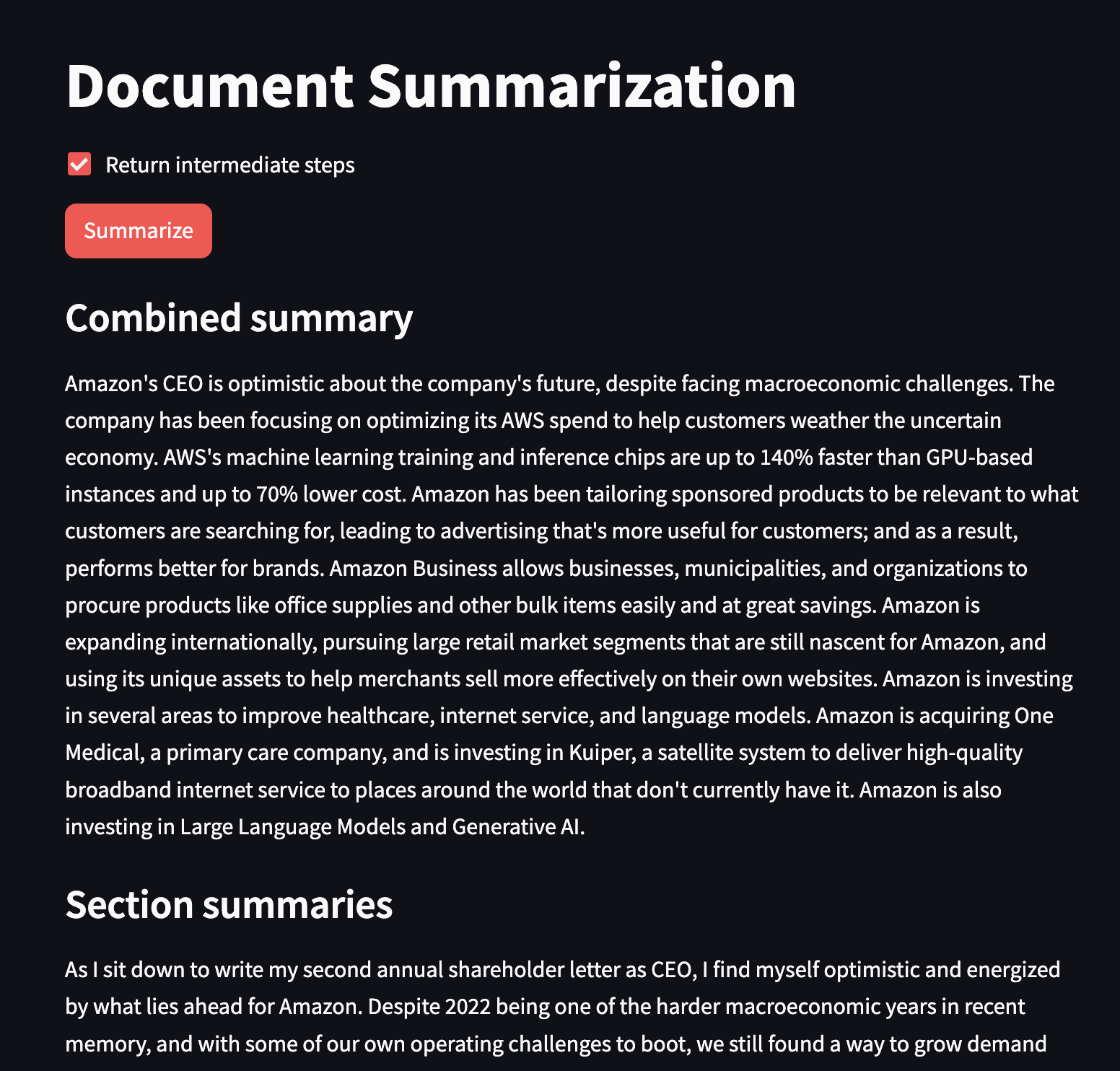
T3 Response Streaming
Backend functions
#imports
from langchain.chains import ConversationChain
from langchain_community.llms import Bedrock

# setup llm
def get_llm(streaming_callback):
    model_kwargs = {
        "max_tokens": 4000,
        "temperature": 0,
        "p": 0.01,
        "k": 0,
        "stop_sequences": [],
        "return_likelihoods": "NONE",
        "stream": True
    }

    llm = Bedrock(
        model_id="cohere.command-text-v14",
        model_kwargs=model_kwargs,
        streaming=True,
        callbacks=[streaming_callback],
    )

    return llm

# call bedrock, stream response
def get_streaming_response(prompt, streaming_callback):
    conversation_with_summary = ConversationChain(
        llm=get_llm(streaming_callback)
    )
    return conversation_with_summary.predict(input=prompt)
Frontend UI
import streaming_lib as glib  # reference to local lib script
import streamlit as st
from langchain_community.callbacks.streamlit import StreamlitCallbackHandler # <<<<<

# titles
st.set_page_config(page_title="Response Streaming")  # HTML title
st.title("Response Streaming")  # page title

# Inputs
input_text = st.text_area("Input text", label_visibility="collapsed")
go_button = st.button("Go", type="primary")  # display a primary button

# Outputs
if go_button:  # code in this if block will be run when the button is clicked
    #use an empty container for streaming output
    st_callback = StreamlitCallbackHandler(st.container())
    streaming_response = glib.get_streaming_response(prompt=input_text, streaming_callback=st_callback)
add requirements: anthropic
Run it: streamlit run streaming_app.py --server.port 8080
Success
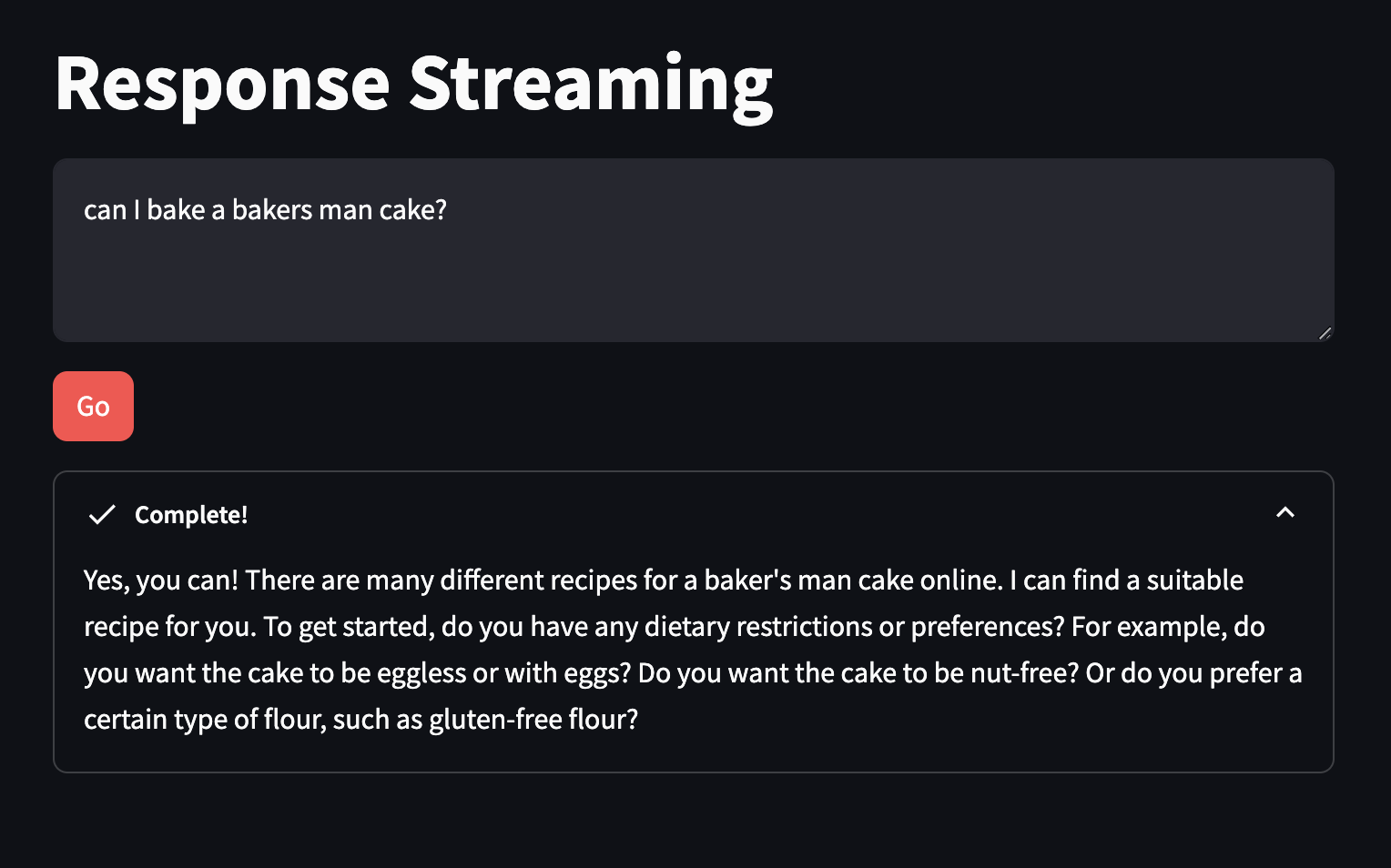
T4 Embeddings Search
This is similar to RAG setup, with one important distinction- the user query is a "search" of the vector database, and not generating a new result.
Note we're using in-memory FAISS vectorstore, in real world we'd use something more persistent.
Backend functions
#imports
from langchain_community.embeddings import BedrockEmbeddings
from langchain.indexes import VectorstoreIndexCreator
from langchain_community.vectorstores import FAISS
from langchain_text_splitters import CharacterTextSplitter
from langchain_community.document_loaders.csv_loader import CSVLoader

# create in-memory store
def get_index(): #creates and returns an in-memory vector store to be used in the application

    embeddings = BedrockEmbeddings() #create a Titan Embeddings client

    loader = CSVLoader(file_path="sagemaker_answers.csv")

    index_creator = VectorstoreIndexCreator(
        vectorstore_cls=FAISS,
        embedding=embeddings,
        text_splitter=CharacterTextSplitter(chunk_size=300, chunk_overlap=0),
    )

    index_from_loader = index_creator.from_loaders([loader])

    return index_from_loader

# call bedrock
def get_similarity_search_results(index, question):
    results = index.vectorstore.similarity_search_with_score(question)

    flattened_results = [{"content":res[0].page_content, "score":res[1]} for res in results] #flatten results for easier display and handling

    return flattened_results

# get embeddings
def get_embedding(text):
    embeddings = BedrockEmbeddings() #create a Titan Embeddings client

    return embeddings.embed_query(text)
Frontend UI
import streamlit as st #all streamlit commands will be available through the "st" alias
import embeddings_search_lib as glib #reference to local lib script

# titles
st.set_page_config(page_title="Embeddings Search", layout="wide") #HTML title
st.title("Embeddings Search") #page title

# add vector index to session cache
if 'vector_index' not in st.session_state: #see if the vector index hasn't been created yet
    with st.spinner("Indexing document..."): #show a spinner while the code in this with block runs
        st.session_state.vector_index = glib.get_index() #retrieve the index through the supporting library and store in the app's session cache

# inputs
input_text = st.text_input("Ask a question about Amazon SageMaker:") #display a multiline text box with no label
go_button = st.button("Go", type="primary") #display a primary button

# outputs
if go_button: #code in this if block will be run when the button is clicked

    with st.spinner("Working..."): #show a spinner while the code in this with block runs
        response_content = glib.get_similarity_search_results(index=st.session_state.vector_index, question=input_text)

        st.table(response_content) #using table so text will wrap


        raw_embedding = glib.get_embedding(input_text)

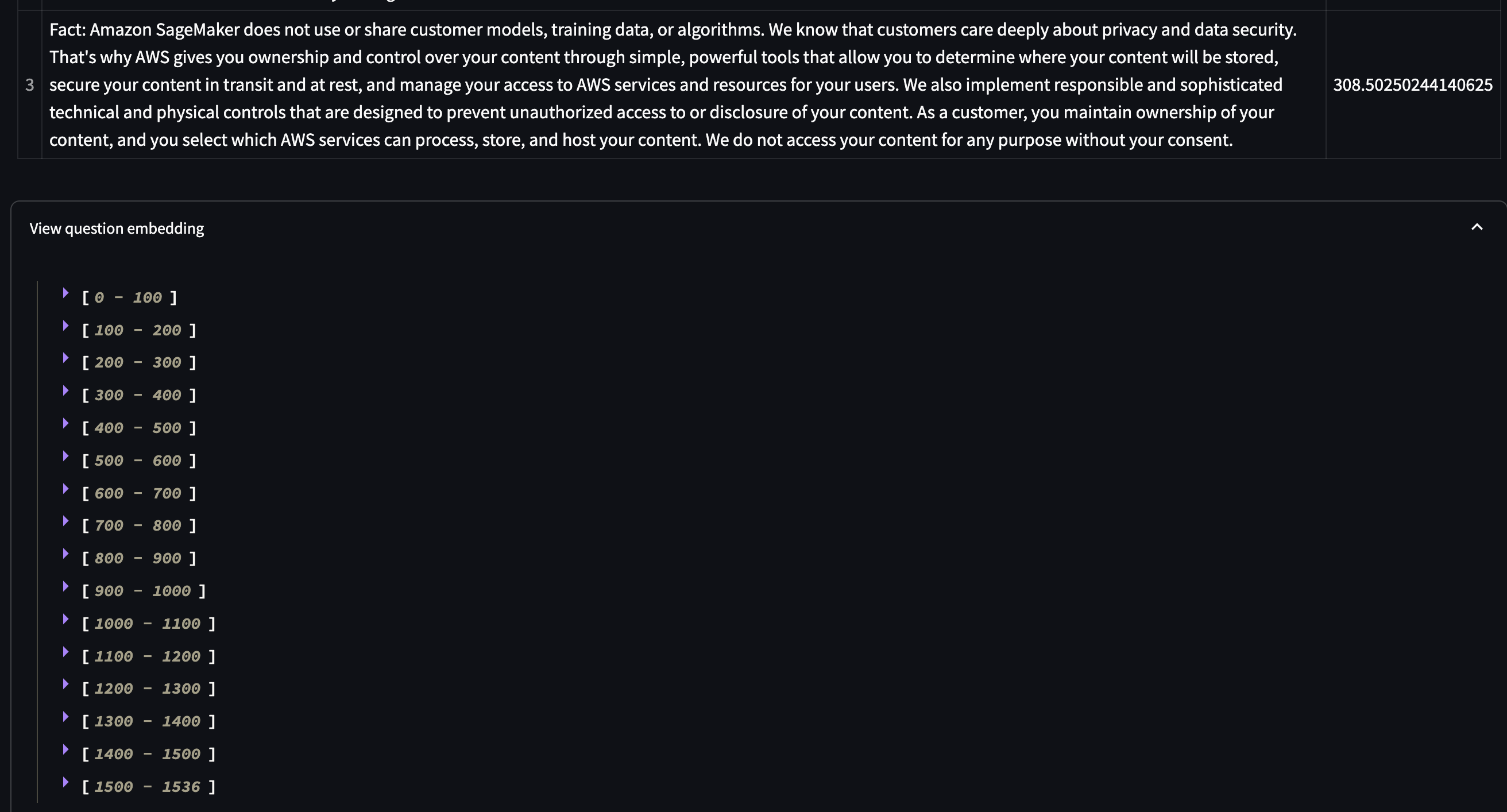
        with st.expander("View question embedding"):
            st.json(raw_embedding)
add requirements: anthropic
Run it: streamlit run embeddings_search_app.py --server.port 8080
Success
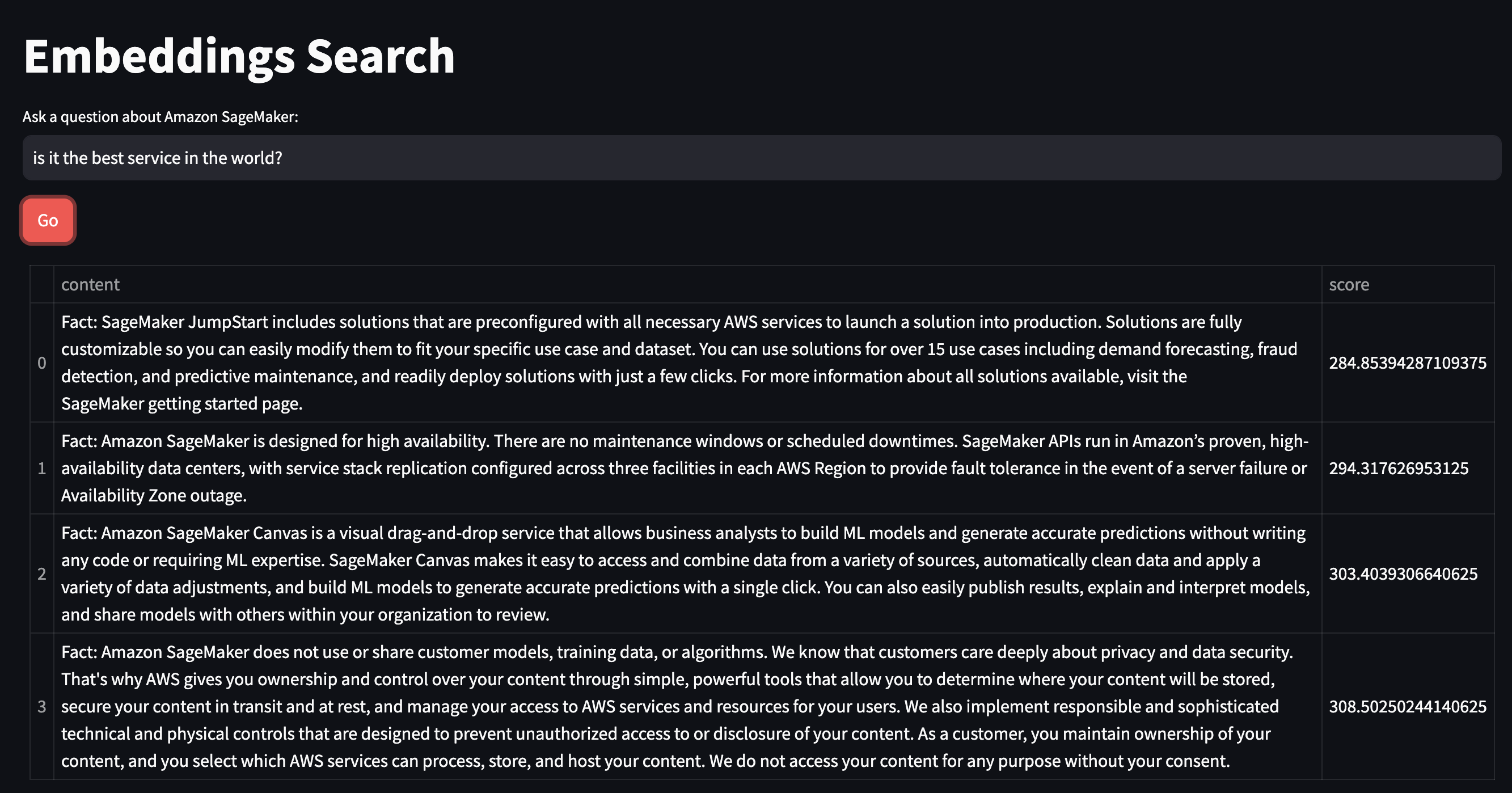
check out the embeddings values
T5 Personalised Recommendations
in a nutshell, user query -> RAG match query -> results go to LLM for "personalised summary".
Backend functions
from langchain_community.llms import Bedrock
from langchain_community.embeddings import BedrockEmbeddings
from langchain.indexes import VectorstoreIndexCreator
from langchain_community.vectorstores import FAISS
from langchain_text_splitters import RecursiveCharacterTextSplitter
from langchain_community.document_loaders import JSONLoader

# setup llm
def get_llm():

    model_kwargs = { #AI21
        "maxTokens": 1024,
        "temperature": 0,
        "topP": 0.5,
        "stopSequences": [],
        "countPenalty": {"scale": 0 },
        "presencePenalty": {"scale": 0 },
        "frequencyPenalty": {"scale": 0 }
    }

    llm = Bedrock(
        model_id="ai21.j2-ultra-v1", #set the foundation model
        model_kwargs=model_kwargs) #configure the properties for Claude

    return llm

#function to identify the metadata to capture in the vectorstore and return along with the matched content
def item_metadata_func(record: dict, metadata: dict) -> dict:

    metadata["name"] = record.get("name")
    metadata["url"] = record.get("url")

    return metadata

# in memory vectory store
def get_index(): #creates and returns an in-memory vector store to be used in the application

    embeddings = BedrockEmbeddings() #create a Titan Embeddings client

    loader = JSONLoader(
        file_path="services.json",
        jq_schema='.[]',
        content_key='description',
        metadata_func=item_metadata_func)

    text_splitter = RecursiveCharacterTextSplitter( #create a text splitter
        separators=["\n\n", "\n", ".", " "], #split chunks at (1) paragraph, (2) line, (3) sentence, or (4) word, in that order
        chunk_size=8000, #based on this content, we just want the whole item so no chunking - this could lead to an error if the content is too long
        chunk_overlap=0 #number of characters that can overlap with previous chunk
    )

    index_creator = VectorstoreIndexCreator( #create a vector store factory
        vectorstore_cls=FAISS, #use an in-memory vector store for demo purposes
        embedding=embeddings, #use Titan embeddings
        text_splitter=text_splitter, #use the recursive text splitter
    )

    index_from_loader = index_creator.from_loaders([loader]) #create an vector store index from the loaded PDF

    return index_from_loader #return the index to be cached by the client app

# call bedrock
def get_similarity_search_results(index, question):
    raw_results = index.vectorstore.similarity_search_with_score(question)

    llm = get_llm()

    results = []

    for res in raw_results:
        content = res[0].page_content
        prompt = f"{content}\n\nSummarize how the above service addresses the following needs : {question}"

        summary = llm.invoke(prompt)

        results.append({"name": res[0].metadata["name"], "url": res[0].metadata["url"], "summary": summary, "original": content})

    return results
Frontend UI
import streamlit as st #all streamlit commands will be available through the "st" alias
import recommendations_lib as glib #reference to local lib script

# titles
st.set_page_config(page_title="Personalized Recommendations", layout="wide") #HTML title
st.title("Personalized Recommendations") #page title

# add vector index to session cache
if 'vector_index' not in st.session_state: #see if the vector index hasn't been created yet
    with st.spinner("Indexing document..."): #show a spinner while the code in this with block runs
        st.session_state.vector_index = glib.get_index() #retrieve the index through the supporting library and store in the app's session cache

# add inputs
input_text = st.text_input("Name some key features you need from a cloud service:") #display a multiline text box with no label
go_button = st.button("Go", type="primary") #display a primary button

# add outputs
if go_button: #code in this if block will be run when the button is clicked

    with st.spinner("Working..."): #show a spinner while the code in this with block runs
        response_content = glib.get_similarity_search_results(index=st.session_state.vector_index, question=input_text)

        for result in response_content:
            st.markdown(f"### [{result['name']}]({result['url']})")
            st.write(result['summary'])
            with st.expander("Original"):
                st.write(result['original'])
add requirements: jq
Run it: streamlit run recommendations_app.py --server.port 8080
Success
You can see the recommendation summary compared to the full service documentation in the 'Original' section.

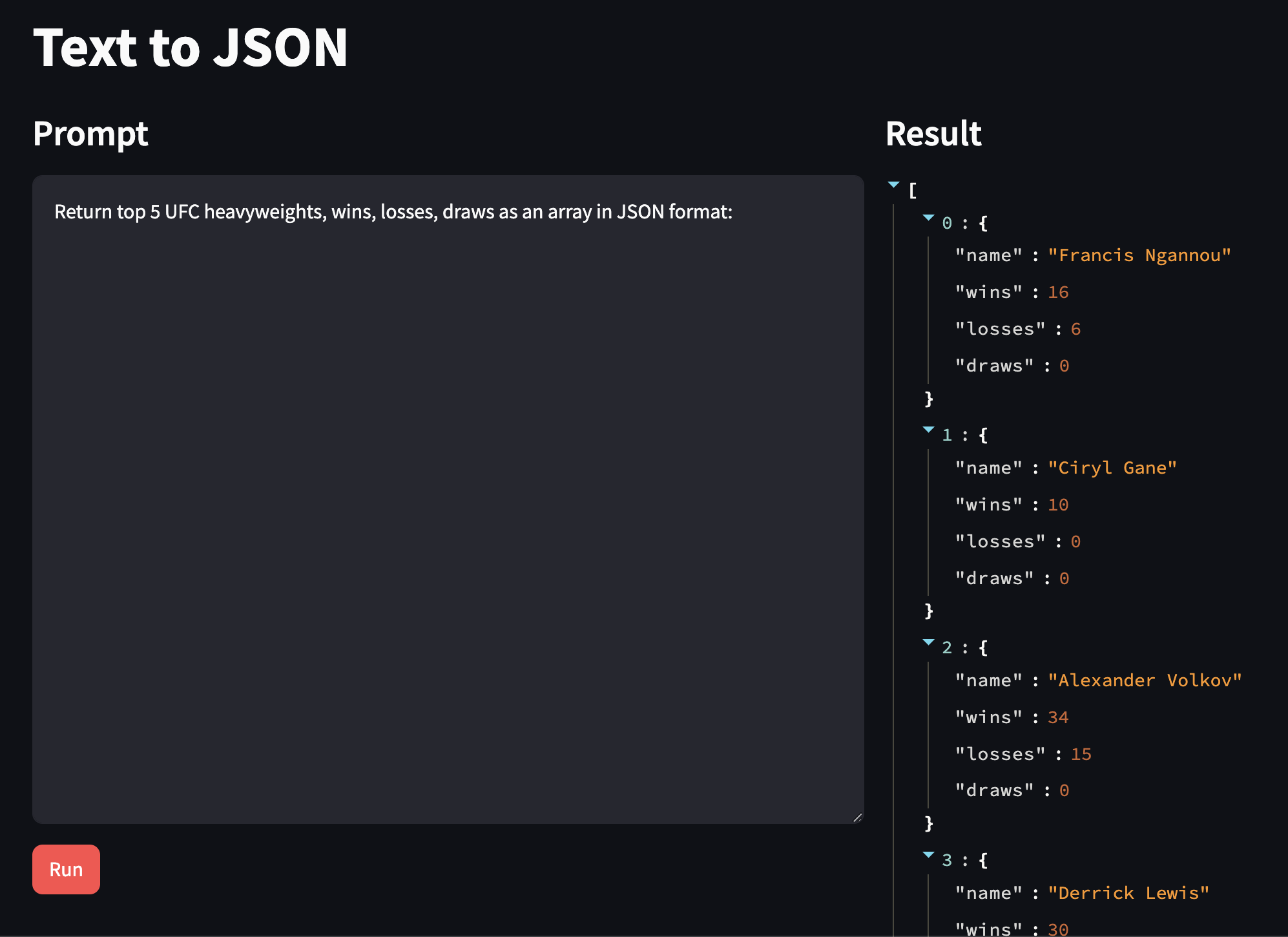
T6 Extract JSON
Backend functions
import json
from json import JSONDecodeError
from langchain_community.llms import Bedrock

# get llm
def get_llm():

    llm = Bedrock( #create a Bedrock llm client
        model_id="ai21.j2-ultra-v1", #use the AI21 Jurassic-2 Ultra model
        model_kwargs = {"maxTokens": 1024, "temperature": 0.0 } #for data extraction, minimum temperature is best
    )

    return llm

# convert to JSON
def validate_and_return_json(response_text):
    try:
        response_json = json.loads(response_text) #attempt to load text into JSON
        return False, response_json, None #returns has_error, response_content, err

    except JSONDecodeError as err:
        return True, response_text, err #returns has_error, response_content, err

# call bedrock
def get_json_response(input_content): #text-to-text client function

    llm = get_llm()

    response = llm.invoke(input_content) #the text response for the prompt

    return validate_and_return_json(response)
Frontend UI
import streamlit as st #all streamlit commands will be available through the "st" alias
import json_lib as glib #reference to local lib script

# titles
st.set_page_config(page_title="Text to JSON", layout="wide")  #set the page width wider to accommodate columns
st.title("Text to JSON")  #page title
col1, col2 = st.columns(2)  #create 2 columns

# inputs, col layout left
with col1: #everything in this with block will be placed in column 1
    st.subheader("Prompt") #subhead for this column

    input_text = st.text_area("Input text", height=500, label_visibility="collapsed")

    process_button = st.button("Run", type="primary") #display a primary button

# output, col layout right
with col2: #everything in this with block will be placed in column 2
    st.subheader("Result") #subhead for this column

    if process_button: #code in this if block will be run when the button is clicked
        with st.spinner("Running..."): #show a spinner while the code in this with block runs
            has_error, response_content, err = glib.get_json_response(input_content=input_text) #call the model through the supporting library

        if not has_error:
            st.json(response_content) #render JSON if there was no error
        else:
            st.error(err) #otherwise render the error
            st.write(response_content) #and render the raw response from the model
add requirements:
Run it: streamlit run json_app.py --server.port 8080
Success
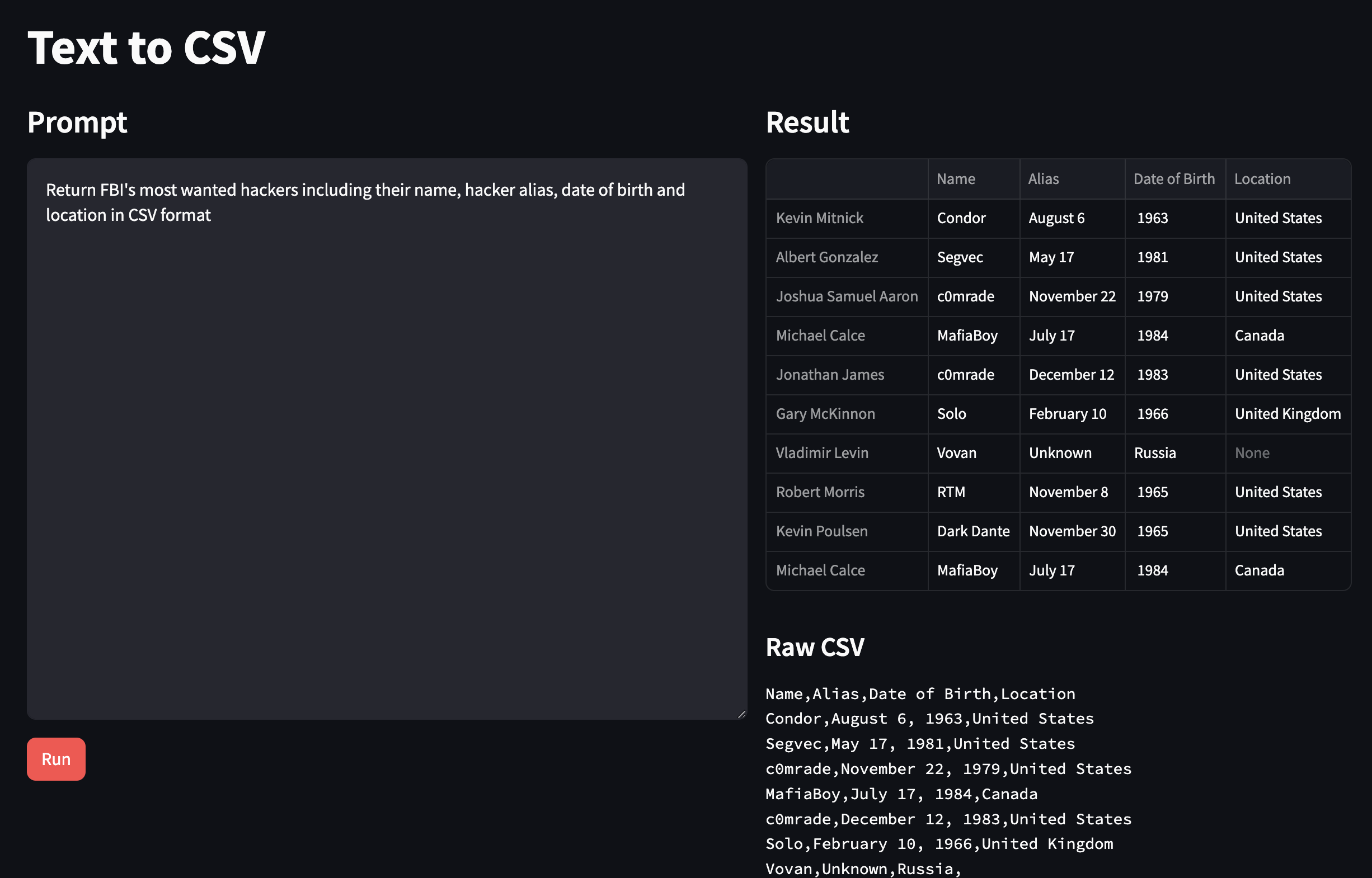
T7 Text to CSV
Backend functions
import pandas as pd
from io import StringIO
from langchain_community.llms import Bedrock

# setup llm
def get_llm():

    llm = Bedrock( #create a Bedrock llm client
        model_id="ai21.j2-ultra-v1", #use the AI21 Jurassic-2 Ultra model
        model_kwargs = {"maxTokens": 1024, "temperature": 0.0 } #for data extraction, minimum temperature is best
    )

    return llm

# convert result to pandas dataframe
def validate_and_return_csv(response_text):
    #returns has_error, response_content, err
    try:
        csv_io = StringIO(response_text)
        return False, pd.read_csv(csv_io), None #attempt to load response CSV into a dataframe

    except Exception as err:
        return True, response_text, err

# call bedrock
def get_csv_response(input_content): #text-to-text client function

    llm = get_llm()

    response = llm.invoke(input_content) #the text response for the prompt

    return validate_and_return_csv(response)
Frontend UI
import streamlit as st #all streamlit commands will be available through the "st" alias
import csv_lib as glib #reference to local lib script

# titles
st.set_page_config(page_title="Text to CSV", layout="wide")  #set the page width wider to accommodate columns
st.title("Text to CSV")  #page title
col1, col2 = st.columns(2)  #create 2 columns

# inputs
with col1: #everything in this with block will be placed in column 1
    st.subheader("Prompt") #subhead for this column

    input_text = st.text_area("Input text", height=500, label_visibility="collapsed")

    process_button = st.button("Run", type="primary") #display a primary button

# outputs col layout, result table top, raw data bottom

with col2: #everything in this with block will be placed in column 2
    st.subheader("Result") #subhead for this column

    if process_button: #code in this if block will be run when the button is clicked
        with st.spinner("Running..."): #show a spinner while the code in this with block runs
            has_error, response_content, err = glib.get_csv_response(input_content=input_text) #call the model through the supporting library

        if not has_error:
            st.dataframe(response_content)

            csv_content = response_content.to_csv(index = False)

            st.markdown("#### Raw CSV")
            st.text(csv_content)

        else:
            st.error(err)
            st.write(response_content)
add requirements: anthropic
Run it: streamlit run csv_app.py --server.port 8080
Success
Troubleshooting
Error Messages
When I tried python3 ./params.py "anthropic.claude-v2" "Write a haiku:"
I got this error:
Traceback (most recent call last):
  File "/home/rxhackk/.local/lib/python3.10/site-packages/langchain_community/llms/bedrock.py", line 444, in _prepare_input_and_invoke
    response = self.client.invoke_model(**request_options)
  File "/home/rxhackk/.local/lib/python3.10/site-packages/botocore/client.py", line 553, in _api_call
    return self._make_api_call(operation_name, kwargs)
  File "/home/rxhackk/.local/lib/python3.10/site-packages/botocore/client.py", line 1009, in _make_api_call
    raise error_class(parsed_response, operation_name)
botocore.errorfactory.ValidationException: An error occurred (ValidationException) when calling the InvokeModel operation: Malformed input request: #: extraneous key [max_tokens] is not permitted, please reformat your input and try again.
As at April 6th, 2024 the models parameters have been updated (per docs) to the following:
{
  "modelId": "anthropic.claude-v2:1",
  "contentType": "application/json",
  "accept": "*/*",
  "body": "{\"prompt\":\"\\n\\nHuman: Hello world\\n\\nAssistant:\",\"max_tokens_to_sample\":300,\"temperature\":0.5,\"top_k\":250,\"top_p\":1,\"stop_sequences\":[\"\\n\\nHuman:\"],\"anthropic_version\":\"bedrock-2023-05-31\"}"
}
I tested the other models, and their default params haven't changed:
/workshop/labs/params ❯ python3 ./params.py "cohere.command-text-v14" "Write a haiku:" .env at 12:11:23
Haiku is a form of Japanese poetry that consists of three lines. The first line has five syllables, the second line has seven syllables, and the third line has five syllables. Here is an example of a haiku:
Spring rain opening
the silent flowers after
a cold, dry winter
Would you like me to write another haiku for you?
/workshop/labs/params ❯ python3 ./params.py "meta.llama2-13b-chat-v1" "Write a haiku:" took 4s .env at 12:16:26
The sun sets slowly
Golden hues upon the sea
Peaceful evening sky
/workshop/labs/params ❯ python3 ./params.py "mistral.mistral-7b-instruct-v0:2" "Write a haiku:" .env at 12:17:09
Autumn leaves fall slow
Whispers of the wind’s song
Nature’s symphony
Haiku is a form of traditional Japanese poetry. It consists of three lines with a 5-7-5 syllable count. The haiku should capture a moment in nature and convey a sense of seasonality and imagery. In this haiku, I have tried to capture the feeling of autumn leaves falling slowly and the sound of the wind as it rustles through them. The phrase "Nature's symphony" is used to emphasize the beauty and harmony of the natural world during this season.
python3 ./params.py "amazon.titan-text-express-v1" "Write a haiku:" .env at 12:17:31
I am a
I am a bookworm
I read a lot